Thursday, July 3, 2014

ED 7730 - The Elements of an E-Portfolio

When I think of the word portfolio, I think back to my second year of teaching and working on my BEST portfolio.  My BEST portfolio was a large stack of papers, copied in threes, with a videotape (in VHS form of course), and all I could think was this would be so much easier if I could send this electronically.  However, I had to send it by mail, and hope that it got there safely.  Yet the results were sent electronically.  Was I missing something?

We are now coming to a time where many of our work has become electronic.  From signing documents to taking tests, the use of technology has increased exponentially in just the past few years.

A portfolio is a collection of resources and accomplishments that represent an individual, group or organization.  This is usually in paper format.

An e-portfolio is a digital collection of resources, accomplishments, and artifacts that represent the individual, group or organization.  These resources can be video or audio clips, text based, and graphics.

So what is the difference?  Couldn't I just take all of my paper documents and make them electronic and then I have a portfolio?  In essence, you could, but that would not be a very exciting portfolio.

The most important part of your e-portfolio is your purpose.

  • What is your portfolio about?
  • Who is your audience?
  • What are the goals?


The next part of your e-portfolio is the collection of artifacts.

  • This is the bulk of the portfolio.  You will include your information here.
  • Videos
  • Text based writings
  • Audio clips
Once you have collected your artifacts, you must provide a reflection on them.
  • Why are you including these pieces?
  • What do they mean to you?

After reflecting on your artifacts, this provides an opportunity for dialogue and feedback between you an others that have access to your e-portfolio (such as a teacher).
  • Teachers can provide feedback as to what needs to be re-worked

After you have been provided feedback for all artifacts (numerous times), your e-portfolio is ready to be evaluated.
  • Be sure to reflect and obtain feedback continuously before getting a final evaluation on a portfolio.

Lastly, your e-portfolio is ready for publication!


Saturday, June 21, 2014

EDUC 7726 Final Assignment - Summarizing My Learning

For our final assignment in EDUC 7726, we were asked to create a conceptual map of our learning from the class.  This could be done in a few different ways.  We could choose to summarize our learning from the class or relate our learning to future plans and how the program would be used in our future endeavors.  I chose to create a concept map that summarized the learning of the class as a whole.  I created this map using Coggle. Below is an image of my map:


The title/topic of my concept map was Assessing in the Digital Era.  I focused on the different ways to assess that we talked about in our EDUC 7726 class.  These different assessment techniques were:

  • Technology and Assessment
    • Symbiotic
    • Visual
    • Technical Quality
  • Assessing Digital Literacy
  • Assessing Digital Competencies
  • Assessing MOOCs
  • 21st Century Skills
  • Summative and Formative Assessments
  • Barriers to Technology
In the technology and assessment section of my mind map, I discuss symbiotic assessment, visual assessment, and technical quality.  Symbiotic assessments are purposeful, planned, and use multiple measure to assess students.  Symbiotic assessments provides and opportunity for teaching, learning and assessing to be interchanged.  With visible assessments, it is more student centered and students are aware of the methods, targets, and strategies.  The technical quality of assessments speaks to the validity, reliability, and fairness of the assessments used.

When assessing digital literacies and digital competencies, there are many important topics to consider.  Some of these are creativity, communication, collaboration, and critical thinking.

A new type of course that is being integrating is called a MOOC.  A MOOC is a massive open online course and there are many different considerations to assessing these types of courses.  The most recent have been peer assessments and automated grading systems.

One important topic that we briefly discussed this trimester was on 21st century skills.  21st century skills focus on critical thinking where students are asked to evaluate, synthesize, and analyze.  They also focus on problem solving where students are asked to reason, interpret, and apply.  They also focus on creativity, where students must be innovative and curious in their work.  Lastly, they focus on metacognition, where skills on mindfulness and reflection are focused on.

Two types of assessments that can be applies digitally are formative and summative assessments.  Formative assessments use a variety of different collaborative online tools.  These can be given at the beginning of class, middle of class or the end of class. Students can be given choices , such as project based learning.  Summative assessments typically end a unit.  Summative assessments can be done using a variety of technological tools.  Some tools can include: clickers, Google Forms, Socrative, etc.

The top barriers to technology integration are a lack of vision, lack of leadership, lack of money, curriculum, infastructure, parental involvement, time, and assessment.

I really enjoyed learning about different ways to assess through technolgy.  Throughout this course I learned many different techniques from my colleagues.  There are many different ideas that I plan to take away from this course and this program.

A link to my mind map can be found here: Assessing in the Digital Era Mind Map

Sunday, June 15, 2014

ED 7724 Week 12 Prompt #1

For our first prompt this week, we were to act as a student with a disability that uses an AT device and write a letter to a post-secondary university explaining the device and why it is necessary.  My letter is below:


To Whom it May Concern,


My name is Amy Paskov and I suffer from a visual impairment called Optic Nerve Hypoplasia or ONH. ONH refers to the underdevelopment of the optic nerve during pregnancy. ONH is one of the three most common causes of visual impairment in children and unfortunately it can not be cured.  Throughout my educational career, I have dealt with this disability.  Optic Nerve Hypoplaysia is stable and it will not deteriorate my vision, in fact as I grow older, my vision may improve as my brain matures, however, my lack of depth perception and photophobia (not being able to look directly at the light) is what I worry about the most.  Which is why I am writing this letter to you.


Being accepted to a post secondary school was a dream come true.  I always had the best accommodations growing up and I am hoping that I can continue receiving these services.  If they do not continue, I fear that my vision could worsen if I do not receive services for my vision and depth perception.  I am asking that you allow me to use my screen magnification reader as I can read large text, but not small text. I also use a text to speech reader on the computer that allows me to write on the computer and reads back to me. 


Also I have included some strategies that may help professors that I come into contact with in class.

  • Allow student to sit near the board (within 3 to 5 feet) and in a central location.
  • If possible, provide a copy of what you have written on the board to the student. (or enlarge print)
  • Lighting can cause sensitivity to the student's eyes, so please allow student to wear tinted lenses in class if needed.
  • Avoid glares on working surfaces (a piece of dark colored paper taped to the entire desk surface diminishes glare off the desk)
  • Avoid using red/orange/yellow on Smartboards or Whiteboards
  • Give the student extra time especially on tests.
I would like this institution to let me continue my use of my magnification reader and speech reader.  I do not want to make more work for anyone and I will answer any questions anyone has about my disability.  I just want all of the professors to be made aware of my disability and the accommodations that will be necessary for my success at this institution.  I thank you in advance for you assistance and look forward to working with you.

Sincerely,


Amy Paskov


References:

Emilio, Born with Optic Nerve Hypoplasia. (n.d.). - VisionAware. Retrieved June 15, 2014, from http://www.visionaware.org/info/eye-conditions-personal-stories/emilio-born-with-optic-nerve-hypoplasia/35

Optic Nerve Hypoplasia Pediatric Visual Diagnosis Fact Sheet™. (n.d.). Optic Nerve Hypoplasia Pediatric Visual Diagnosis Fact Sheet. Retrieved June 15, 2014, from http://www.tsbvi.edu/seehear/spring99/opticnerve.htm

Visual Impairment, Including Blindness. (n.d.). National Dissemination Center for Children with Disabilities. Retrieved June 15, 2014, from http://nichcy.org/disability/specific/visualimpairment#types


Thursday, June 5, 2014

ED 7726 Week 10 Soapbox

For this week's assignment, we met online and had a "soapbox" hangout.  I enjoyed this types of hangout, as we each chose a topic and developed a short presentation on it to share with our colleagues.  It was really nice to get an in depth look into some of the topics that my colleagues chose.

I chose to speak about Assessing MOOCs.  A large part about assessing MOOCs is using peer assessment.  What made me really connect our soapbox to assessing MOOCs was that we were asked to peer assess two of our colleagues during our hangout.

When you are assessing MOOCs there are often many students that are enrolled in the MOOC course.  We often wonder that if there are so many students, how do you know that the students are doing so well if there are so many, where does the assessment come in?  This brought back a journey that I took when we enrolled in a DLMOOC during our Distance Learning class with Ian.  Although we were not being "assessed" by anyone in the MOOC, we all knew that Ian was watching us and the work we completed, so ultimately we were being assessed.

However, many MOOCs are not looking into automated grading.  For multiple choice, true/false and short answer, automated grading has been working for many years.  However, many MOOCS are looking into automated grading for essays.  If you begin grading essays through an automated grading system, you take out a lot of the creativity and personality that students put into their writing.  This is a benefit of having a human teacher correcting these types of assignments.

All in all, upsides and downsides to MOOCs and ways to assessing them.  As MOOCs become more and more popular, assessment strategies will become more common.  This may mean students will have to go to a facility to take an exam or an exam may be corrected by a computer teacher.  Only time will tell.

Here is a link to my presentation on Assessing MOOCs: Assessing MOOCs Presentation

Friday, May 30, 2014

ED 7724 Week 9 Summary-Assistive Technology in the Whole Classroom

This week I was the Discussion Facilitator for the class.  My topic was about using Assistive Technology and incorporating it into the whole classroom.  In Chapter 7 of Bryant and Bryant's Assistive Technology for People with Disabilities, they explain many different types of software for various classrooms.  These software programs can be used for whole group instruction without making students with disabilities feel like they are being singled out.  This week, I asked my colleagues to read through the different software and choose one that they found interesting.  I then asked them do do a bit of research on the software.  I wanted to know what the software was about, and what the pros and cons were.  I learned about many different types of software for different grade levels and subject areas.  Here are a few:

  • Dollars and Cents
    • The new Dollars and Cents features three programs:Counting Coins, Spending Money, and Making Change. All programs are easy to navigate and have clear graphics. You can also change the currency (US or Canadian).  There are 4 activities in Counting Coins:Naming, Matching, Sorting, and Vending Machine.  In the Spending Money activity, students shop for items and pay for them with computer cash, using the exact amount or the next-dollar approach.  In Making Change, the most advanced program, students act as store clerks, entering purchases and giving back change. (http://www.attainmentcompany.com/dollars-cents-software)
  • Efofex
    • Provides free software for students with special needs through the Empower Program. Many students with physical disabilities find mathematics and science extremely difficult to write. The equations and graphics are too difficult to write with standard tools on computer programs. The Efofex products are designed to make mathematics and science teacher's jobs easier but many students with special needs have found that they also provide the assistance they need. (http://efofex.com/empower.php)
  • Inspiration
    • Visual learning strategies such as graphic organizers, diagrams, outlines are being used more in classrooms across the country.  As students are required to incorporate information from a variety of sources, integrate new knowledge with what they already have learned, and improve writing skills and think critically, visual learning tools help students meet those demands.  With the combination of visual learning and technology, students learn to clarify , organize and analyze information, integrate new knowledge, and think critically. (http://www.inspiration.com/visual-learning)
  • Mindtwister Math
    • This game can be played by 1 to 3 third-grade students. Players need to think quickly, as the software of reviews math skills in a competitive manner. Because of the competitiveness, it would not be as appropriate for struggling math students. MindTwister Math provides fun and unique challenges.  This software is designed to review and reinforce 3rd-grade math curriculum facts. Students are taken through a series of games with 4 skill levels, and can play alone or with one or two friends/classmates. (http://school.discoveryeducation.com/parents/reviewcorner/software/mindtwistermath.html)
  • Mrs. Riley's Picture Cards and Page Builder
    • PageBuilder is an application that helps you make, share, and print your own picture cards. It’s drag and drop is easy to use  and you can get started right away by clicking the giant green button up top.  (http://mrsriley.com/home)
  • Start to Finish
    • The Start-to-Finish Library offers struggling readers a selection of narrative chapter books written at two levels (Gold for 2nd-3rd Grade level, Blue for 4th-5th grade level)  Students accomplish several goals with this unique series: they practice reading fluently and with comprehension using multiple text and electronic supports, while accessing the curriculum’s required topics, genres and literature.(http://donjohnston.com/stflibrary/#.U4fEk3JdVuo)
  • Wordmaker
    • WordMaker uses a variety of activities to build phonics skills. Students build on the words they know how to read and spell to create new words. The 140 progressive lessons focus students on specific letter combinations, that teach early readers to look for patterns and apply what they know about them when encountering words. (http://donjohnston.com/wordmaker/#.U4fE3HJdVuo)
  • Write: Out Loud
    • Write:OutLoud is easy to use and reads words to as they are written, providing real-time  feedback. Writing tools, including talking spell checker, homophone checker, and dictionary help your students confirm their choice of words in a language they feel comfortable with. (http://donjohnston.com/writeoutloud/)

After I learned about the software, I asked my colleagues if they would use this in their classrooms.  Each of them had a use for these programs and were quick to explain how it would be implemented.  It was great to see that many of these programs could be implemented for all students and not just those with disabilities.  I looked into to these different programs and found them all to be very helpful and hope to incorporate many of them into my own classroom in the future.  I am thankful that my colleagues were able to share this information with me this past week.

I enjoyed learning about these programs in greater depth and look forward to learning about more programs for students with disabilities to use within the whole classroom.

Tuesday, May 20, 2014

EDUC 7726 - Week 8 Formative Assessment

Formative assessment is when teachers provide ongoing feedback to students through out the unit to improve their learning. Formative assessments help students identify their strengths and weaknesses and target areas that need work and help faculty recognize where students are struggling and address problems immediately. - Carnegie Mellon University -

Many teachers use formative assessment in the classroom.  Formative assessment can be done at different points during the course of the lesson.


Previewing a Lesson:

      Before beginning a new lesson, many times student are unsure of what the new unit holds for them.  To begin the unit on a good foot, many teachers start each day with a daily review exercise to keep the students' minds remembering what was learned in the previous day.  As a different approach to beginning an entirely new unit, teachers can use Beyond Question Clickers or Smart Notebook Clickers (whichever they have available) to create short quizzes for the students.  These are interactive devices where the students must answer the multiple choice or true/false questions by choosing the correct choice on their personal remote. The system will then grade the quiz for you.  These questions can be embedded into a powerpoint as well.


During the Learning:

      During learning, it is sometimes difficult to assess students.  As a teacher you constantly as the students if 
they have questions, but they always say no, or you are answered by silence so you move on to the next topic.  With Today's Meet you can give the classroom a name (Room 203) and students can sign in each day.  Today's Meet can be left on the projection screen and if students have questions, all they have to do is type them in and it will automatically send and add to the list. This is a backchannel where you can see everything the students really want to ask, but are afraid to.  The students can put their name or they can be anonymous.  They are limited to 140 characters, similar to twitter, so their questions can be short.


After the lesson:

      For many instructors, once a lesson or unit is over, it is time for a test or a quiz.  This usually results in a type of assessment.  In order for the students to prepare for the assessment, have the students review in a fun and interactive way. The students will play a FREE game based blended learning and response system called Kahoot!  As the teacher, you can create the questions using any device, build quizzes with images and video, or find pre-made quizzes.  Students can use any device with a web browser including a laptop, IPad, IPhone, IPod, Android, Chromebook, PC, and more. If they do not have one, they can share with a friend and be a "team". You can project the quiz on the screen at the front of the room to engage students in the game.  Without each student needing an account, logging on is quick and their name appears on a list at the front of the room.  This is also a great way for students to prepare for the summative assessment while having fun at the same time.


  1. The goal of formative assessment is to monitor student learning to provide ongoing feedback that can be used by instructors to improve their teaching and by students to improve their learning. More specifically,formative assessments: help students identify their strengths and weaknesses and target areas that need work. - Carnegie Mellon University-

Friday, May 16, 2014

EDUC 7726 Week 7 - Assessing Technology and Digital Literacy Skills

      As teachers begin to enter into a technological world, they will need to know how to assess students with technology and digital literacy skills.  This can be a difficult process, one that will need much developing.

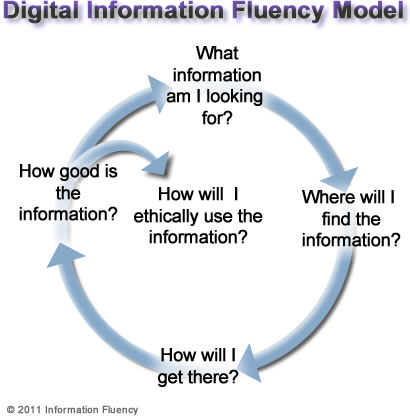
      To be digitally literate, one must be able to find and create content using information technologies and the internet.  There are many overlapping components of digital literacy that must be following in order to be considered digitally literate. These components are creativity, functional skills, e-safety, effective communication, ability to find information, collaboration, cultural and social understanding, and critical thinking and evaluation. 


      There are three frameworks that are followed when relating any work to digital literacy.  These frameworks follow the ORMS model.  There is Online Collaborative Inquiry, Online Content Construction, and Online Reading Comprehension.  More information on these frameworks can be found here: ORMS Model

     For students to be digitally proficient, they must be able to effectively engage with technology.  Technology impacts every part of our lives and students need to use it to learn, communicate and collaborate.  This is why many teachers can use technology to assess students.  They can even use technology to connect their assessments to the common core standards. Common Sense Media provides charts that align Common Core to technology skills and digital competencies.  To view this chart, please click here: Common Core Chart


      According to ETS Testing, digital fluency is a term that captures critical thinking and communication in an online environment.  Technology is requiring our students (and ourselves) to become digitally savvy in critical thinking, creativity, communication, and collaboration skills.


      How can we assess digital competencies?  ISTE recommends assessing students on the following categories: creativity and innovation, communication and collaboration, research and information fluency, critical thinking, problem solving, and decision making, digital citizenship, and technology operations and concepts.  

      There are many different formal assessments that can be done digitally.  For example: SAILS, TRAILS, iSkills, SBAC, 21st Century Skills, etc.  Also, many tests can now be made through Google forms creating online assessment for students that can be sent to the teacher. To give students choices, students can work collaboratively on projects, or on PLE's.  There are many different opportunities to digital assessment and the students are excited to try them.

      A link to our prezi can be found here: Assessment of Digital Literacy and Technology Skills Prezi